

Your client wants a store that stands out, with unique product pages, a homepage promotions carousel, and a checkout that inspires confidence. And they want it by next week. Divi 5 WooCommerce opens up possibilities that the classic Woo Products module didn't allow. I'll show you how to leverage the Loop Builder to create product displays that convert.
Key Takeaways
- The Loop Builder is a superior replacement for the Woo Products module for custom displays
- Divi 5's native WooCommerce modules allow you to design each product page element individually
- Customizing the cart page and checkout directly improves the conversion rate
- Custom fields (via ACF) naturally integrate into your product loops
- A high-performing store requires impeccable design, which you can achieve by following our guide to modern Divi 5 layouts
Prerequisites and Access to Divi 5
To put all this into practice, you need three key elements. First, Divi 5 🔗 the new and latest version also called Divi Pro. Next, if you haven't migrated yet, Divi Builder 🔗 lets you start immediately on your current theme. Finally, for an optimized environment without hosting hassles, Divi Hosting 🔗 is preconfigured with Divi and Redis—ideal if you're starting from scratch or looking to eliminate server bottlenecks.
Understanding the two product display approaches in Divi 5
Divi 5 offers two distinct methods for displaying your WooCommerce products. Each addresses different needs, and understanding their respective strengths will save you hours of development time.
The Woo Products Module: Simplicity and Speed
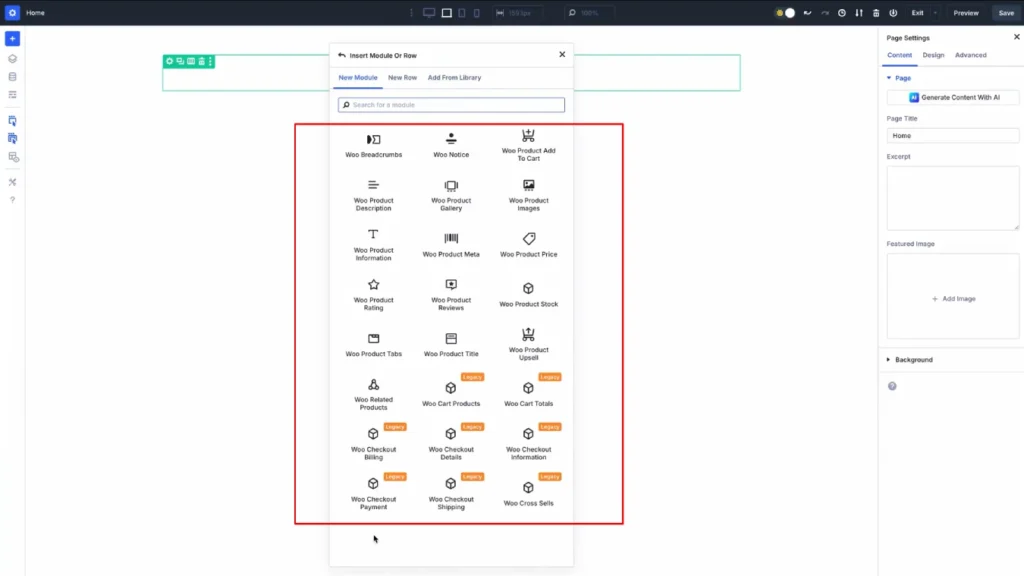
The Woo Products module remains the most direct option for displaying a product grid. You drag it onto your page, configure a few filters, and your products appear. Image, title, price, promo badge, rating stars, add to cart button: everything is pre-configured.
This approach works perfectly in several cases: standard catalog without specific customization, quick display of promotional products, or a grid of related products on a product page. The module automatically handles the connection with WooCommerce and offers integrated filters: featured products, on sale, specific category.
Pros:
- Configuration in a few clicks
- Native WooCommerce filters (featured, on sale, best-selling)
- No technical knowledge required
- Simplified maintenance
Caveats:
- Fixed card structure, limited customization
- Cannot add custom fields
- Limited layout options (no access to advanced Grid/Flexbox controls)
- Identical design for all product cards
The Loop Builder: Total Design Freedom
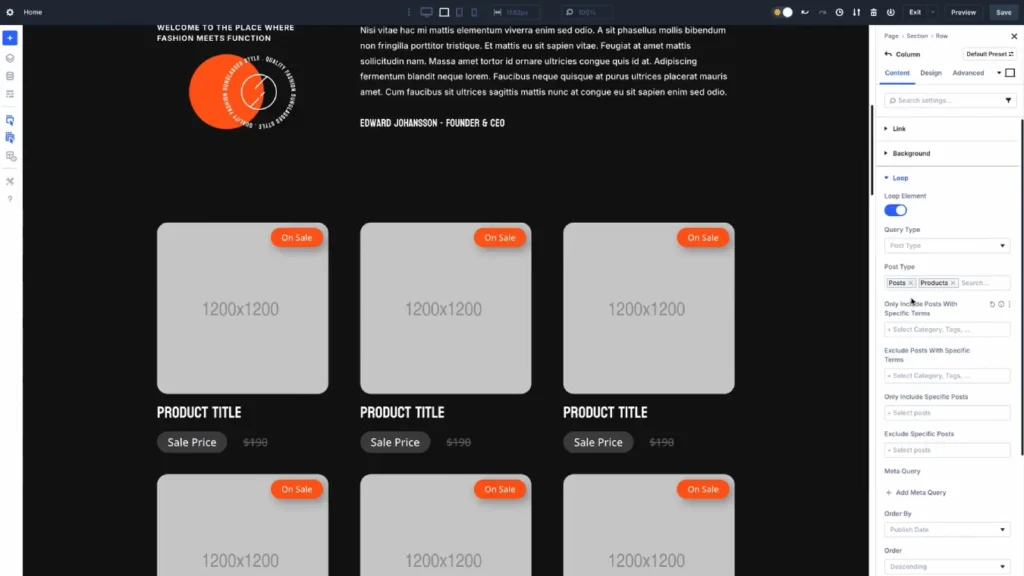
The Loop Builder adopts a radically different philosophy. Instead of starting from a pre-configured module, you build your product card module by module. A container in "Loop" mode, configured for the "Product" post type, automatically repeats the structure for each product matching your criteria.
This method requires more initial work, but it removes all creative limitations. You decide the exact placement of each element, add custom fields, and apply CSS Grid and Flexbox techniques for layouts impossible with the standard module.
For a clothing store project, I used the Loop Builder to create product cards with a dynamic "Eco-responsible" badge (via an ACF custom field), a visual stock gauge, and an asymmetrical layout where the image overflows onto the details block. The click-through rate to product pages increased by 31% compared to the standard grid.
Configuring the Loop Builder for WooCommerce
Setting up a product loop follows a precise logic. Here's the method I consistently apply.
Step 1: Create the Container Structure
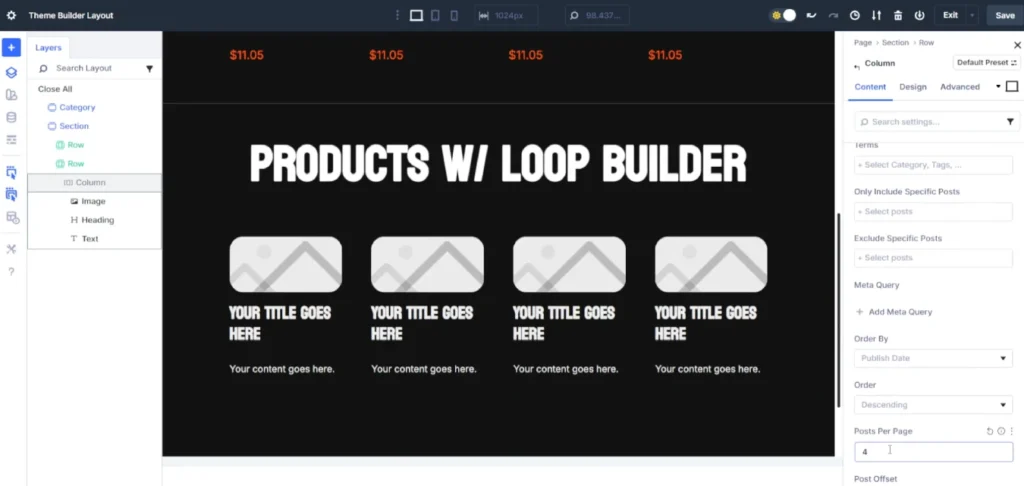
Add a container (Container) to your page and enable the "Loop" option in its settings. Select "Products" as the query type. Define the number of items to display and the filtering criteria: category, tags, sort order.
The container then becomes a template that repeats for each product. Any module you place inside will be displayed as many times as there are matching products.
Step 2: Assemble the Product Card Modules
Inside the loop container, build your product card with the modules of your choice:
- Image Module: connect it to "Product Featured Image" via dynamic content
- Heading Module: associate it with "Product Title"
- Text Module: display "Product Price" or "Product Short Description"
- Button Module: link it to the "Add to Cart" action or the product URL
Each module accepts dynamic content via the database icon in its settings. Divi automatically offers the available WooCommerce fields.
Step 3: Apply Style and Layout
This is where the Loop Builder reveals its power. Use Flexbox controls to horizontally align the image and product information. Apply CSS Grid to the parent container to create a responsive grid. Add hover interactions to energize the display.
To display your promotional products on your homepage, you can use the Loop Builder to create a custom product grid with visual effects impossible to achieve with the standard module.
Recommended configuration for a 3-column grid:
- Parent container in CSS Grid
- Template Gap: 30px (horizontal and vertical)
- Columns: 3 on desktop, 2 on tablet, 1 on mobile
- Product card with fixed image ratio for uniformity
Customize the Product Page with WooCommerce Modules
Divi 5 integrates modules dedicated to each element of a product page. This granularity allows for the design of custom product pages via the Theme Builder.
Available Modules for the Product Page
Here are the WooCommerce modules you can freely combine:
- Product Images: main gallery with zoom and customizable thumbnails
- Product Title: title with full typographic control
- Product Price: display of price and promotions
- Product Rating: rating stars
- Product Description: long description with formatting
- Product Meta: categories, tags, SKU
- Product Tabs: tabs (description, information, reviews)
- Add to Cart: add button with quantity selector
- Related Products: related products
Create a Custom Product Page Template
In Divi 5's Theme Builder, create a new template assigned to the "Product" type. Use CSS Grid to structure your layout: image area on the left, information on the right, full-width tabs below.
For a cosmetics store, I designed a product page with the main image occupying 60% of the width, a sticky block for the price and purchase button, and redesigned tabs as an accordion on mobile. The average time spent on product pages increased by 45 seconds.
Pros:
- Total control over each element
- Consistency with the overall site design
- Optimization possible by product type
- Native integration of custom fields
Caveats:
- Longer initial setup
- Requires structure planning
- Mandatory tests on several product types
Modify the Cart Page and Checkout
The shopping experience doesn't end at the product page. The cart and checkout pages directly influence the conversion rate.
Customize the Cart with Divi 5
Divi 5's Cart module allows you to fully style the cart page. You control the appearance of the product table, the update and checkout buttons, and the promo code areas.
Recommended optimizations:
- Add reassurance badges (free shipping, easy returns)
- Display recommended products below the cart
- Visually simplify the table on mobile
- Highlight the checkout button
Create a Custom Checkout
The payment page is the critical step where cart abandonments multiply. Divi 5 allows you to redesign this page to make it more reassuring and fluid.
The Checkout module is broken down into sections: customer information, shipping address, payment method, summary. Each section accepts independent styling, and you can reorder them.
I worked on a single-column checkout with visual progress (numbered steps), a sticky order summary on desktop, and clearly visible security icons. The abandonment rate decreased by 18% after this redesign.
Elements to prioritize for optimization:
- Clarity of form fields
- Visibility of accepted payment methods
- Order summary always visible
- Trust badges (secure payment, guarantees)
Integrate Custom Fields with ACF
WooCommerce stores standard data: price, stock, categories. But your products often have specific information that the standard Products module cannot display.
Configure ACF for WooCommerce
Advanced Custom Fields (ACF) remains the benchmark for adding custom fields to products. Create a field group assigned to the "Product" type and define your fields: material, country of origin, organic certification, estimated delivery time.
These fields then appear in the editing interface of each product, and most importantly, they become accessible in the Loop Builder via the "Custom Field" option of dynamic content.
Display Custom Fields in the Loop Builder
Once your ACF fields are configured, integrate them into your product loop:
- Add a Text module to your product card
- Enable dynamic content
- Select "Custom Field"
- Enter the ACF field name
You can combine static text and dynamic fields. For example: "Material: [dynamic field material]" will display "Material: Organic Cotton" for each product.
Common use cases:
- Conditional eco-responsible badge
- Custom delivery time per product
- Certifications and labels
- Care information
- Internal note (not displayed) for sorting
Testing Protocol for Your Divi 5 WooCommerce Store
Before going live, always validate these points.
Testing context:
- Divi 5.0+, WordPress 6.4+, WooCommerce 8.0+
- Active plugins: ACF Pro, Yoast SEO, WP Rocket (or equivalent)
- Test products: minimum 10 with variations in price, stock, categories
Test scenario:
- Browse the catalog on desktop, tablet, mobile
- Check the display of all product types (simple, variable, grouped)
- Test the complete purchase journey (cart → checkout → confirmation)
- Validate transactional emails
- Monitor performance with PageSpeed Insights
Target metrics for e-commerce:
- LCP < 2.5s on catalog pages
- TTI < 3.8s on product pages
- CLS < 0.1 (crucial to avoid accidental clicks)
- Baseline conversion rate: measure before/after optimization
FAQ
Does the Loop Builder work with variable products?
The Loop Builder displays variable products like simple products. However, variations (size, color) are only displayed on the individual product page, not in the grid. For a clothing store with many variations, maintain the standard flow to the full product page.
Can the Loop Builder be used in the Theme Builder?
Absolutely. It's even the recommended method for creating catalog or category page templates. Configure the Loop Builder with the "Posts for Current Page" option so it automatically displays products from the viewed category.
Are WooCommerce filters (featured products, on sale) available in the Loop Builder?
The Loop Builder does not natively integrate specific WooCommerce filters. To filter by featured or on-sale products, use categories, tags, or create custom queries via plugins like FacetWP. For a simple filtered display, the Woo Products module remains more direct.
Is the custom checkout compatible with payment gateways?
Yes, visual customization does not affect functionality. Stripe, PayPal, and other gateways function normally. However, always thoroughly test the complete journey after any checkout modification.
Is ACF mandatory for custom fields?
No, other solutions exist: Pods, Meta Box, ACPT, Toolset. ACF remains the most widespread and best documented. Some WooCommerce extensions also add their own custom fields accessible via the Loop Builder.
My Verdict: Products Module or Loop Builder?
The Woo Products module is suitable if:
- You are quickly creating a standard catalog
- You don't need custom fields
- You use native WooCommerce filters (featured, on sale)
- You prioritize ease of maintenance
The Loop Builder is suitable if:
- You want a unique product card design
- You display custom fields (ACF)
- You master CSS Grid and Flexbox for advanced layouts
- You are creating a differentiating e-commerce experience
In practice, both coexist. I often use the Products module for related product widgets, and the Loop Builder for prominent homepage sections and custom category pages.
WooCommerce + Divi 5 Setup Checklist
- Install WooCommerce and configure basic options (currencies, taxes, shipping)
- Create at least 10 test products with images, descriptions, categories
- Configure ACF with necessary custom fields
- Create a product page template in the Theme Builder
- Build a product grid with the Loop Builder
- Customize the cart and checkout pages
- Test the complete journey on all devices
- Measure performance and optimize
Next Steps
You have the basics to create a custom WooCommerce store with Divi 5. To go further:
- Master CSS Grid vs Flexbox for sophisticated product layouts
- Add dynamism with the testimonial carousel tutorial, adaptable to featured products
- Get inspired by Divi 5 layout examples for your category pages
- Dive deeper into the Loop Builder for advanced dynamic displays
The day you launch your first store with custom product pages, dynamic grids, and an optimized checkout, you'll understand why the time invested in Divi 5 WooCommerce transforms your e-commerce projects.
Tools marked with 🔗 are affiliate links. If you make a purchase, I earn a commission at no extra cost to you. For more details, you can view the full transparency disclosure page.

