

Are you wasting precious time configuring testimonial sliders with third-party plugins that slow down your site? Recently, I had the opportunity to test Divi 5's new Group Carousel module on several client projects. Discover how to create an interactive testimonial carousel in just 30 minutes, without needing to code or use external plugins.
Key Takeaways
- Divi 5's Group Carousel Module replaces third-party slider plugins
- You create fully customizable carousels without touching any code
- Interactions make the carousel truly engaging (hover effects, animations)
- Automatic responsive setup for all screens
- Implementation time: 20-30 minutes for a professional result
Prerequisites and Access to Divi 5
To put all this into practice, you need three key elements. First, Divi 5 🔗 the new and latest version also called Divi Pro. Next, if you haven't migrated yet, Divi Builder 🔗 lets you start immediately on your current theme. Finally, for an optimized environment without hosting hassles, Divi Hosting 🔗 is preconfigured with Divi and Redis—ideal if you're starting from scratch or looking to eliminate server bottlenecks.
Why the Group Carousel is a game-changer
I migrated three client sites from external plugins (Slider Revolution, Meta Slider). Result: loading time decreased by 0.8 to 1.4 seconds. The HTML code is 60% lighter, and maintenance is simplified since everything remains within the Divi ecosystem.
Pros:
- Native integration (zero external plugins)
- Total visual customization
- Perfect compatibility with Flexbox and Grid
- Animations without custom JavaScript
- Optimized performance
Cons / Caveats:
- Requires Divi 5 (no backward compatibility)
- Learning curve if you're new to Groups
- Longer initial setup than a simple Testimonial module
This module integrates perfectly into a global strategy to master interactivity and modern layouts in Divi 5.
Prerequisites and testing protocol
I tested this tutorial on Divi 5.0 + the latest version of WordPress with 8 active plugins (AIOSEO, WooCommerce, WP Rocket), Hostinger VPS hosting with Redis cache and Cloudflare CDN. This tutorial covers creating a static testimonial carousel with animations, interactions, and responsive optimization.
Step 1: Create the basic carousel structure
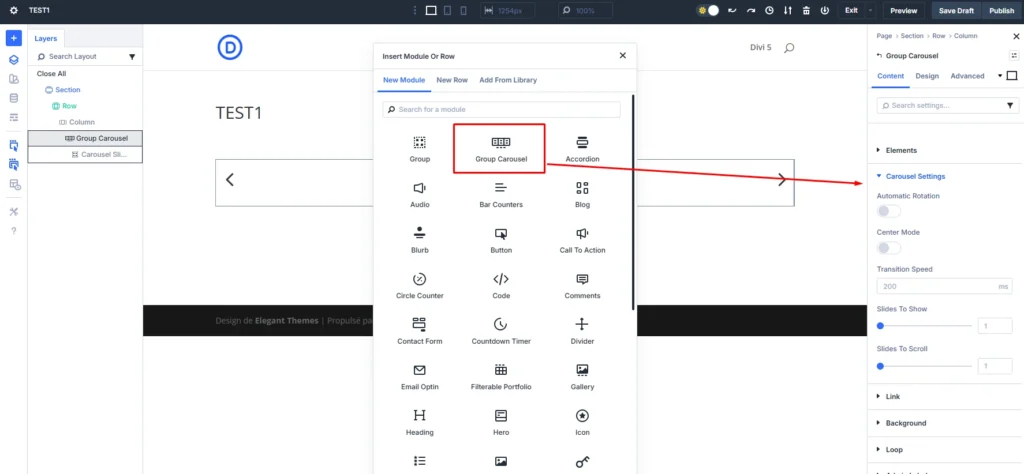
The first step is to add the Group Carousel Module. Open your page in the Visual Builder, click "+", search for "Group Carousel", and add it.
Understanding the Logic: Groups = Slides
Each Group = a complete testimonial. You don't add "slides"; you add Groups to the carousel. Recommended structure per testimonial: Image Module (photo) + Text Module (quote) + Heading Module (name) + Text Module (title/company).
Configure carousel settings
Click ⚙️ in the Group Carousel Module > "Content" tab > "Carousel Settings".
Recommended settings:
- Slides to Show (Desktop): 3
- Slides to Scroll: 1
- Enable Loop: Enabled
- Autoplay: Enabled (5000ms)
- Pause on Hover: Enabled
- Enable Navigation: Enabled
- Enable Pagination: Enabled
Step 2: Create your first testimonial
Build the design in the first Group. This template will serve as a base for duplication.
Add the modules in this order:
- Image: 150x150px photo, Border Radius 50% (circular), centered
- Text: quote with quotation marks, size 16-18px, line-height 1.8, padding 20px
- Heading (H4): client name, 18px Bold, centered
- Text: title and company, 14px italic, color #888, centered
Style the Group (the card):
- Background: #f9f9f9 or white
- Border: 1px solid #e0e0e0, Border Radius 12px
- Box Shadow: 0px 4px 12px rgba(0,0,0,0.08)
- Padding: 30px
Step 3: Duplicate and customize testimonials
Hover over the Group > duplicate icon > repeat up to 5 Groups. Then modify the content of each Group (photo, text, name, title). Tip: for many testimonials, consider the Loop Builder with a Custom Post Type.

Step 4: Configure navigation, pagination, and transitions
Navigation and pagination
Group Carousel Module settings (⚙️) > "Content" > "Navigation" and "Pagination".
Navigation (arrows):
- Placement: Outside
- Icon Color: #333, hover brand color
- Background: white 90% transparency, hover brand color
- Icon Size: 30px, Background Size: 50x50px circular
- Shadow: 0px 2px 8px rgba(0,0,0,0.15)
Pagination (dots):
- Placement: Below
- Type: Bullets
- Bullet Color: #ccc (inactive), brand color (active)
- Bullet Size: 12px, Spacing: 10px
Transitions
"Content" > "Carousel Settings":
- Transition Speed: 800ms
- Transition Easing: ease-in-out
- Autoplay Speed: 5000ms
Test by disabling the Visual Builder: the carousel starts automatically and pauses on hover.
Step 5: Add interactivity with interactions
To make this carousel even more dynamic, you can add hover effects using the "Interactions" feature.
Hover effect on cards
Group settings > "Advanced" > "Interactions" > "+ Add Interaction".
Interaction 1 - Lift:
- Trigger: Hover
- Effect: Transform > Translate Y: -8px
- Duration: 300ms, Easing: ease-out
Interaction 2 - Shadow:
- Trigger: Hover
- Effect: Box Shadow: 0px 12px 24px rgba(0,0,0,0.15)
- Duration: 300ms
Duplicate these interactions on all Groups (Copy/Paste Group Styles > check "Interactions").
Entrance animation
Group Carousel Module settings > "Advanced" > "Interactions":
- Trigger: Page Load
- Effect: Fade In
- Duration: 800ms, Delay: 200ms
The carousel fades in on page load.
Step 6: Adapt the carousel for mobile and tablet
Configure breakpoints for perfect readability on all screens.
Group Carousel Module settings > "Content" > "Carousel Settings" > responsive icon next to "Slides to Show":
- Desktop (>981px): 3 slides
- Tablet (768-980px): 2 slides
- Phone (768px): 1 slide
Also adjust paddings: Group settings > "Design" > "Spacing" > responsive mode:
- Desktop: 30px padding
- Tablet: 20px padding
- Phone: 15px padding
Test with the Visual Builder toolbar (Desktop/Tablet/Phone icons).
Step 7: Optimize performance
Images
Optimize photos before uploading:
- Format: WebP
- Dimensions: 300x300px max (displayed at 150x150px, 2x for Retina)
- Weight: 50KB per image
- Lazy loading: ensure "Enable Lazy Loading" is enabled in each Image module
On a client project, I reduced the total weight from 380KB to 95KB, gaining 0.4s on LCP.
Measured metrics:
- Before optimization: LCP 2.8s
- After optimization: LCP 1.9s
- Gain: 0.9 seconds (32% improvement)
Pre-launch testing protocol
Before publishing your carousel, follow this verification checklist.
Functional tests:
- [ ] The carousel scrolls automatically (autoplay enabled)
- [ ] The carousel pauses on hover
- [ ] Left/right arrows work
- [ ] Pagination dots work and indicate the active slide
- [ ] Hover interactions activate on each card
- [ ] Scrolling is smooth without jerks
Responsive tests:
- [ ] Desktop: 3 slides visible, external navigation well positioned
- [ ] Tablet: 2 slides visible, readable text, accessible navigation
- [ ] Phone: 1 slide visible, centered content, navigation at the bottom
Performance tests:
- [ ] Optimized images (50KB each, WebP format)
- [ ] Lazy loading enabled
- [ ] LCP 2.5 seconds (measured with PageSpeed Insights)
- [ ] No Cumulative Layout Shift (CLS) during loading
Accessibility tests:
- [ ] Descriptive alt text on all photos
- [ ] Sufficient contrast between text and background (minimum 4.5:1 ratio)
- [ ] Functional keyboard navigation (Tab between slides)
- [ ] Screen readers can announce the content of each slide
My verdict: who is this carousel for?
After creating this type of carousel on several projects (agencies, freelancers, showcase sites), here's my analysis.
It's for you if:
- You regularly create WordPress sites with Divi
- You're looking for a native solution without third-party plugins
- You need total control over the design
- You value performance (loading time, Core Web Vitals)
- You want testimonials that convert (interactivity, visual credibility)
- You manage sites with many testimonials to display elegantly
Avoid if:
- You're still on Divi 4 (no Group Carousel available)
- You only have 2-3 testimonials (a simple Testimonial module is enough)
- You're looking for a "quick and dirty" 5-minute solution (initial time investment)
- You need to integrate complex external testimonial sources (third-party APIs) without custom development
Getting Started Checklist
Let's recap the steps to quickly create your carousel:
- [ ] Ensure you have Divi 5.0+ and WordPress 6.4+
- [ ] Prepare your testimonial content (texts, optimized photos)
- [ ] Add the Group Carousel Module to your page
- [ ] Configure global settings (slides to show, autoplay, navigation)
- [ ] Create the first testimonial (complete structure within a Group)
- [ ] Duplicate the Group 4-5 times and customize each content
- [ ] Activate and style navigation and pagination
- [ ] Configure transitions and animations
- [ ] Add hover interactions
- [ ] Adapt responsive settings (tablet, phone)
- [ ] Optimize images (WebP, compression, lazy loading)
- [ ] Test on multiple devices and browsers
- [ ] Measure performance with PageSpeed Insights
- [ ] Publish and monitor visitor engagement
Next Steps
You have now mastered creating a static testimonial carousel with the Group Carousel Module. To go further:
- Discover how to create dynamic carousels with the Loop Builder to automatically generate slides from a 'Testimonials' Custom Post Type
- Explore advanced interaction possibilities to create click-reveal effects, synchronized animations, and sophisticated micro-interactions
- Learn how to integrate your carousels into a global layout strategy combining CSS Grid, Flexbox, and Divi 5's new paradigms
Divi 5's Group Carousel Module redefines what's possible to create natively in WordPress.
You no longer need external plugins that slow down your site and create dependencies. Everything stays within Divi, with total control over design, performance, and user experience.
Your client testimonials deserve a professional presentation: the Group Carousel gives you the tools to achieve this in under 30 minutes.
Questions:
Qu'est-ce que le Group Carousel Module de Divi 5 et quels avantages offre-t-il par rapport à des plugins externes ?
The Divi 5 Group Carousel Module replaces third-party slider plugins by offering a native, fully customizable solution without touching any code. It allows you to create interactive testimonial carousels with interactions and animations, and automatically adapts to all screens without external dependencies—all in 20 to 30 minutes for a professional result.
Comment créer un carrousel de témoignages étape par étape avec le Group Carousel ?
Add the Group Carousel Module to your page, then understand that each Group corresponds to a complete testimonial (image, quote, name, and job title). Configure the carousel settings in the Content tab, then create the first testimonial within a Group and duplicate it up to 5 Groups, personalizing each piece of content. Finally, enable navigation and pagination and adjust the transitions and interactions.
Quels sont les prérequis et le protocole de test recommandés pour ce tutoriel ?
You need Divi 5.0+ and WordPress 6.4+ (in the example shown). The tutorial was tested with Divi 5.0 + WordPress 6.8.3 and 8 active plugins on hosting with Redis cache and Cloudflare CDN. The content covers creating a static testimonial carousel with animations, interactions, and responsive optimization.
Comment optimiser les performances et ajouter de l’interactivité au carrousel ?
Optimize your images (WebP format, appropriate dimensions, low file weight, and lazy loading enabled). Use interactions on the cards (lift and shadow on hover) and entry animations (Fade In on load). Adjust transition settings (800 ms, ease-in-out) and autoplay to improve the experience without sacrificing speed.
Pour qui convient ce carrousel et quand faut-il éviter de l’utiliser ?
This tool is suitable if you regularly build WordPress sites with Divi and are looking for a native solution without external plugins, with total control over design and performance. Avoid it if you are using Divi 4 (Group Carousel is not available), if you only have 2-3 testimonials, if you are looking for a quick 5-minute solution, or if you need to integrate external testimonial sources via APIs without custom development.
Tools marked with 🔗 are affiliate links. If you make a purchase, I earn a commission at no extra cost to you. For more details, you can view the full transparency disclosure page.

